


Projects · Qwote
From customer request to first estimate, with  Qwote.
Your customers describe what they need on your website. Qwote clarifies the request and prepares a first estimate with your price list and your rules.
It is an AI quoting tool developed by Methodia and configured for your company. The estimate is indicative: the parts to assess go to your team. Methodia already uses it for its own software projects.

The work before the quote
Before the price, there is a request to understand.
Requests to interpret
Customers explain what they want to achieve, not which price-list items they need. Translating one into the other takes time and experience.
Missing information
Quantities, variants, constraints: every missing detail is one more exchange before you can answer.
Estimates that depend on who makes them
The rules live in a few people’s heads. When they are busy, requests wait.
How it works
From the request to the conversation with your team.
Customer
Describes the request
In their own words, from a page on your website, after confirming their email.
AI
Maps it to your price list
Recognises what is being asked and matches it with the items and offer you have configured.
AI
Asks what is missing
A few questions, only when they change the estimate, within the limits you set. «I don’t know» is a valid answer.
Price list and rules
Prepares the first estimate
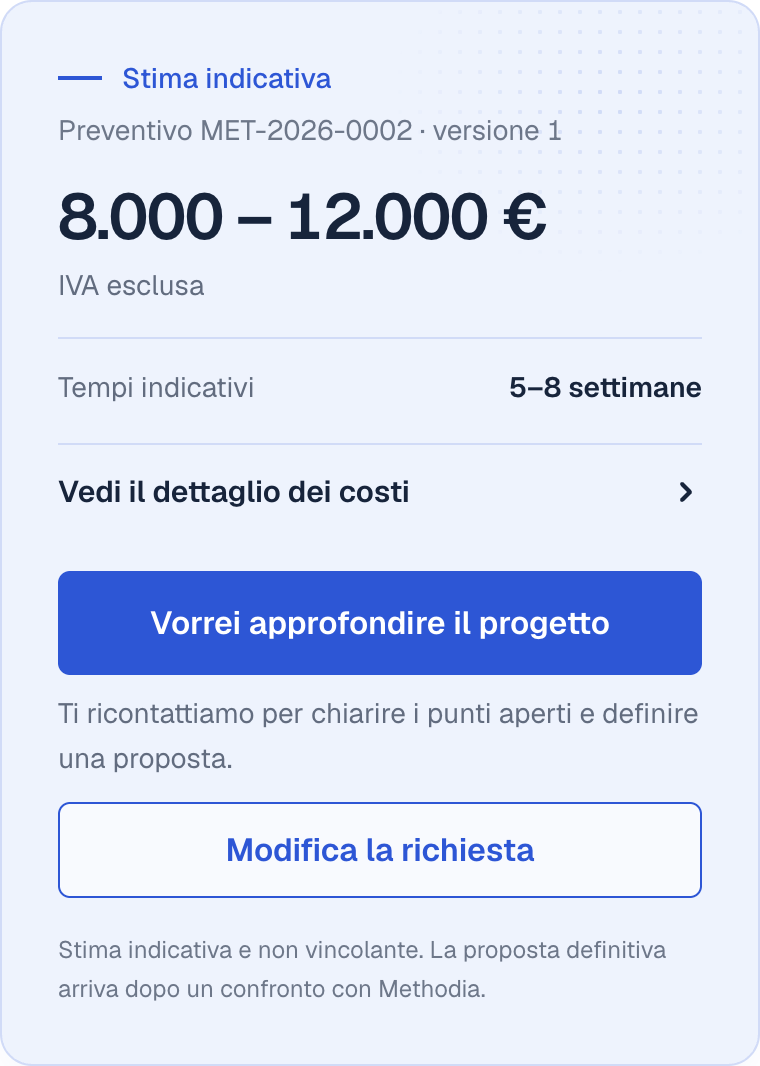
Cost range, breakdown and separate costs; timelines when your price list provides them. The customer also receives it by email, with a quote number.
Person
What the price list does not cover
Stays out of the total, marked as a part to assess, and reaches your team with the reason.
Your team
Follows up and proposes
Receives every request with the details and prepares the final proposal.
Configuration
Configured on how your company works.
Price list and offer
Items and how they are priced, what is included, variants and separate costs.
Questions
What to ask the customer and how many questions at most, so the request never turns into a questionnaire.
Language and examples
The terms and cases your customers use to describe their requests, so Qwote recognises them.
Commercial rules
Rates, discounts, surcharges and exceptions: the ones applied today by whoever prepares your quotes.
When prices or rules change, we update the configuration. Each company has its own installation, with its own data.
What it automates
Qwote prepares. Decisions stay with people.
What Qwote does
- Collects the request the customer writes in their own words.
- Summarises what it understood; the customer can correct it.
- Asks what is missing. When the customer cannot answer, the estimate says so: with a stated assumption or a part to assess.
- Calculates the first estimate with your price list. When a request allows different solutions, it shows them as alternatives, each with its own amount.
- Lets the customer correct the request and get an updated estimate.
- Sends the estimate to the customer and the details to your team, with the same quote number.
What stays with your team
- Assessing the parts your price list does not cover and non-standard requests.
- Deciding discounts, exceptions and the final price: the first estimate is indicative and non-binding.
- Getting back to the customer and preparing the proposal.
- Deciding when prices and rules change: we update the configuration.
- If you prefer, reviewing estimates before the customer sees the amounts: Qwote holds them and notifies the team.
Qwote in use
Methodia uses it for its own software projects.
On the Methodia website, Qwote is configured with our price list: anyone with a software project to build describes it, answers a few questions and receives a first estimate of cost and time.
For us it is a concrete application of the product. For your company the price list, questions and rules change; the path stays the same.
- Have a software project to build with Methodia?
- That is a different path: it leads to an estimate for your project, not to a trial of Qwote for your company. Get a first estimate
Getting started
From your current process to Qwote, configured.
01
Talk through your process
Tell us how requests come in, who prepares quotes and where time gets lost. A few recent examples are enough.
02
Check the case
We look at your price list, rules and typical requests to see how much Qwote can estimate and what would still need assessing. If it is not the right tool, we tell you.
03
Configuration
We prepare the configuration with you, connect the path to a page on your website and test it with sample requests before opening it to customers.
Questions
Before you evaluate Qwote.
Which companies is it for?
Companies that receive requests described in plain words and answer with offers made of items, variants and rules: services, project work, installations, configurable supplies. Today it is in use for Methodia’s software projects; for another industry we check the case before configuring it.
What do you need to evaluate it?
A few recent requests with the quotes that came out of them, your price list or price sources, and the rules applied today by whoever prepares offers. If the price list and rules are scattered, putting them in order is the first step.
Does AI set the prices?
No. AI interprets the request and chooses the questions; the amounts are calculated from your price list and rules. Anything without a price is not made up: it stays to be assessed.
Where do your customers use it?
From a page on your website, connected to Qwote during configuration. Today the channel is the web page: incoming email, chat on other platforms and ready-made widgets are not available.
Does it connect to a CRM or management system?
Today Qwote communicates with your team by email, with all the details of the request. Connections with a CRM, management system or other tools are assessed separately, on your process.
How much does it cost and how long does it take to set up?
It depends on how complex your offer is and on the connections needed: we define it after checking the case, there is no fixed price. We guide you through the initial configuration.
Want to use Qwote in your company?
Tell us how you prepare quotes today: we will assess together whether Qwote fits and what it would take to configure it.